Graphing
VectorMation provides two ways to plot mathematical functions: Graph (full axes, ticks, labels) and FunctionGraph (bare curve only).
Graph
Basic Usage
Example: Basic sin graph
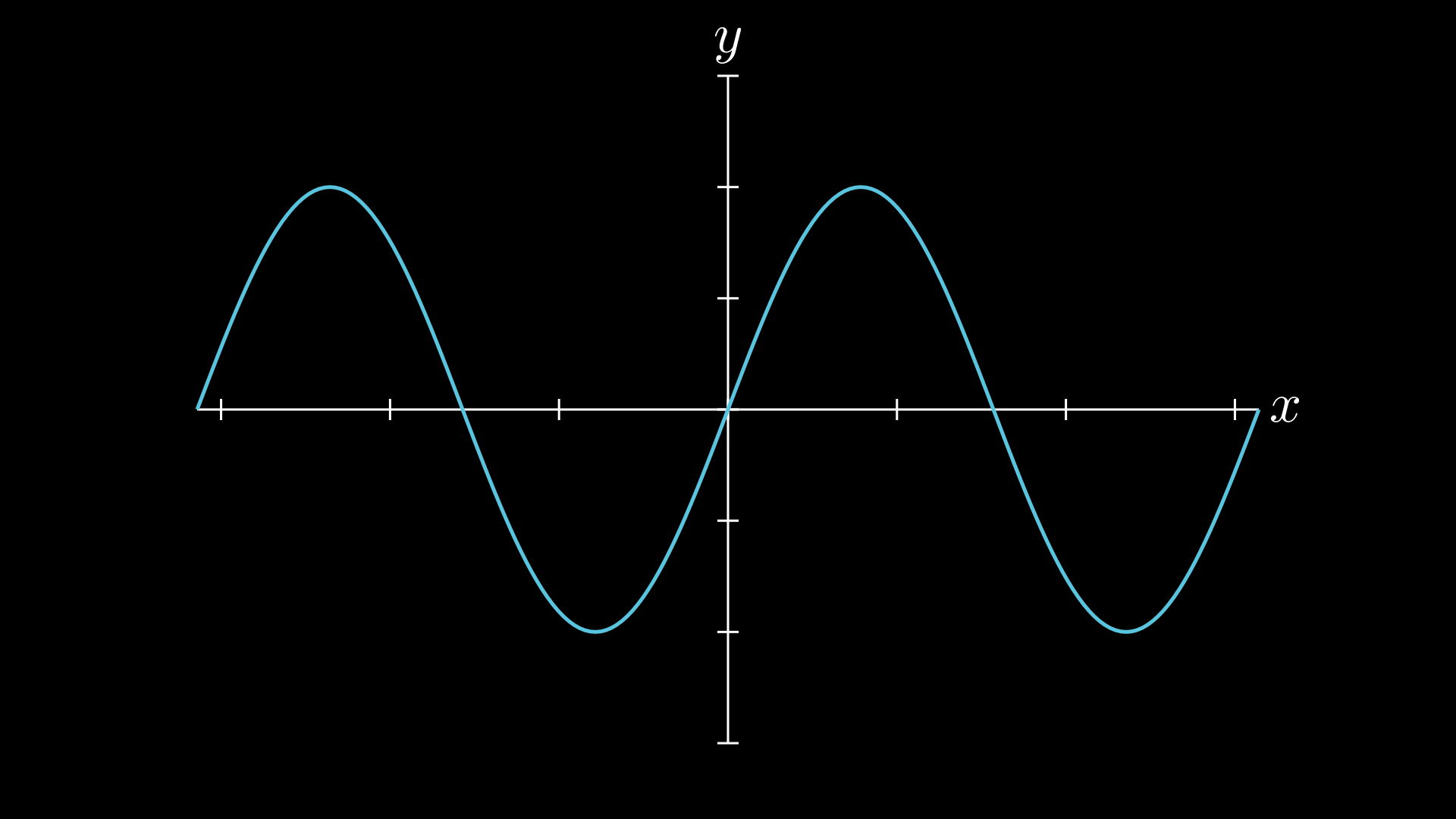
"""Basic sin graph on axes."""
import math
from vectormation.objects import *

v = VectorMathAnim()
v.set_background()

graph = Graph(math.sin, x_range=(-2 * math.pi, 2 * math.pi),
              y_range=(-1.5, 1.5))

v.add(graph)

v.show(end=0)
Constructor
Graph(func, x_range=(-5, 5), y_range=None, num_points=200,
      x=100, y=50, plot_width=800, plot_height=600,
      x_label='x', y_label='y', show_grid=False,
      creation=0, z=0, **styling_kwargs)
Parameter |
Description |
|---|---|
|
A callable |
|
|
|
|
|
Number of sample points for the curve |
|
Top-left position of the plot area in SVG pixels |
|
Size of the plot area in SVG pixels |
|
Axis labels (set to |
|
Show grid lines at tick positions |
|
Passed to the curve (e.g. |
The default curve colour is #58C4DD (light blue) with stroke_width=3.
Auto Y-Range
If y_range is not specified, the graph samples the function across the x-range and automatically determines appropriate y-axis bounds with 5% padding.
Adding More Functions
cos_curve = graph.add_function(math.cos, stroke='#FC6255')
add_function() returns a Path object, which you can animate independently:
cos_curve.create(start=2, end=4)
Animating the Curve
The graph’s curve is a Path accessible as graph.curve. You can animate it:
graph.curve.create(start=0, end=2)      # animate drawing
graph.curve.fadein(start=0, end=1)      # fade in
Sub-Objects
Attribute |
Type |
Description |
|---|---|---|
|
|
The main function curve |
|
|
Animated x-axis range bounds |
|
|
Animated y-axis range bounds |
Coordinate Mapping
The graph provides methods for mapping between math and SVG coordinates:
Math x/y values are mapped linearly to the SVG plot area
The y-axis is inverted (SVG y increases downward)
The axes are positioned at the math origin (0, 0) when it falls within the range
coords_to_point(x, y, time=0)converts math coordinates to SVG pixels
Animated Ranges
The axis ranges (x_min, x_max, y_min, y_max) are Real attributes, so they can be
animated like any other property. Use the convenience methods to animate both ends at once:
ax.set_x_range(0, 2, (1, 4))           # animate x-axis bounds
ax.set_y_range(0, 2, (0, 18))          # animate y-axis bounds
ax.set_ranges((1, 4), (0, 18), start=0, end=2)   # animate both at once
You can also animate individual bounds directly:
ax.x_max.move_to(0, 2, 20) # only change the upper x bound
Example: Animated axis zoom
Axis decorations (lines, ticks, tick labels, grid) automatically re-render each frame to match the current range. Curves resample the function at each frame too, so everything stays in sync.
"""Axes zoom with animated ranges."""
from vectormation.objects import *

v = VectorMathAnim()
v.set_background()

ax = Axes(x_range=(-5, 5), y_range=(-2, 26))
curve = ax.plot(lambda x: x ** 2, stroke='#58C4DD')

# Zoom into x=[1, 4], y=[0, 18]
ax.set_ranges((1, 4), (0, 18), start=0, end=2)

v.add(ax)

v.show(end=3)
Example: Animated Graph
Example: Animated sin + cos
Draw a sin curve, then add and animate a cos curve on the same axes.
"""Animated sin + cos graph creation."""
import math
from vectormation.objects import *

v = VectorMathAnim()
v.set_background()

graph = Graph(math.sin, x_range=(-2 * math.pi, 2 * math.pi),
              y_range=(-1.5, 1.5))

# Draw sin curve
graph.curve.create(start=0, end=2)

# Add and draw cos curve
cos_curve = graph.add_function(math.cos, stroke='#FC6255')
cos_curve.create(start=2.5, end=4.5)

v.add(graph)

v.show(end=5)
FunctionGraph
FunctionGraph plots a function as a bare polyline – no axes, ticks, or labels. Useful when you only need the curve itself, or want to compose it with other objects.
Constructor
FunctionGraph(func, x_range=(-5, 5), y_range=None, num_points=200,
              x=100, y=50, width=800, height=600,
              creation=0, z=0, **styling_kwargs)
Parameter |
Description |
|---|---|
|
A callable |
|
|
|
|
|
Number of sample points |
|
Top-left position of the plot area in SVG pixels |
|
Size of the plot area in SVG pixels |
|
Passed to the polyline (e.g. |
The default curve style is stroke='#58C4DD', stroke_width=3, fill_opacity=0.
Example
Example: FunctionGraph with draw_along
FunctionGraph extends Lines, so all VObject animation methods (fadein, write, shift, etc.) work directly on it.
"""FunctionGraph with draw_along animation."""
import math
from vectormation.objects import *

v = VectorMathAnim()
v.set_background()

curve = FunctionGraph(math.sin, x_range=(0, 2 * math.pi),
                      width=600, height=300, x=200, y=350)
curve.draw_along(start=0, end=2)

v.add(curve)

v.show(end=3)