Utilities
Colours & Gradients
Module: vectormation.colors
- class LinearGradient(stops, x1='0%', y1='0%', x2='100%', y2='0%')
SVG linear gradient. Register with
canvas.add_def(lg)before use.- Parameters:
stops (list) – List of
(offset, color)or(offset, color, opacity)tuples.
Example: Linear gradient fill
from vectormation.colors import LinearGradient
lg = LinearGradient([('0%', '#ff0000'), ('100%', '#0000ff')])
canvas.add_def(lg)
circle = Circle(fill=lg, fill_opacity=1)
Example: Gradients
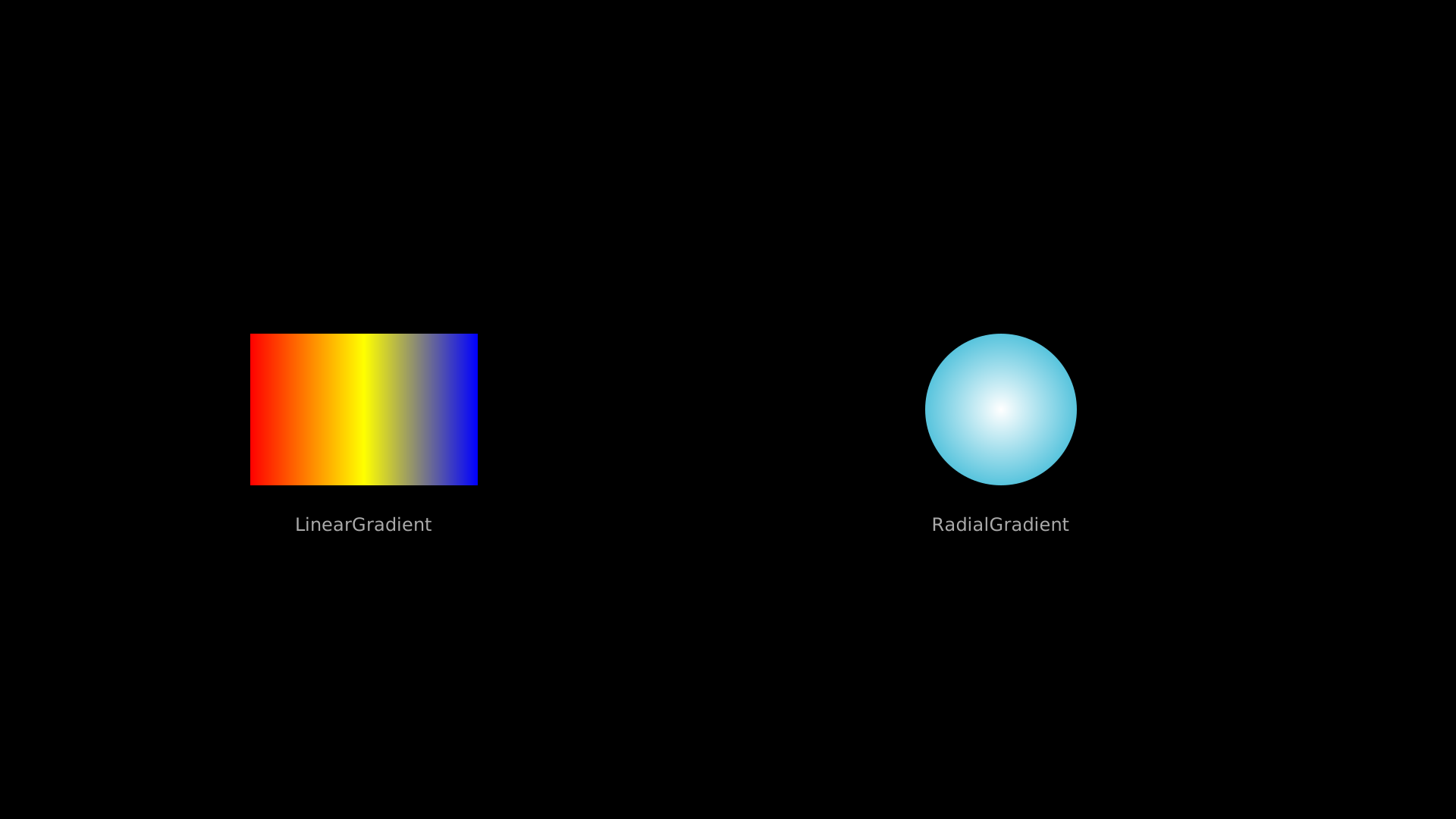
Linear and radial gradients on shapes.
"""Linear and radial gradients on shapes."""
from vectormation.objects import *
from vectormation.colors import LinearGradient, RadialGradient

v = VectorMathAnim()
v.set_background()

lg = LinearGradient([('0%', '#ff0000'), ('50%', '#ffff00'), ('100%', '#0000ff')])
v.add_def(lg)

rg = RadialGradient([('0%', '#ffffff'), ('100%', '#58C4DD')])
v.add_def(rg)

rect = Rectangle(300, 200, x=330, y=440, fill=lg, fill_opacity=1, stroke_opacity=0)
circ = Circle(r=100, cx=1320, cy=540, fill=rg, fill_opacity=1, stroke_opacity=0)

l1 = Text('LinearGradient', x=480, y=700, font_size=24, fill='#aaa', text_anchor='middle')
l2 = Text('RadialGradient', x=1320, y=700, font_size=24, fill='#aaa', text_anchor='middle')

v.add(rect, circ, l1, l2)

v.show(end=2)
- fill_ref()
Returns the URL reference for use in fill attributes.
- class RadialGradient(stops, cx='50%', cy='50%', r='50%', fx=None, fy=None)
SVG radial gradient.
- Parameters:
stops (list) – List of
(offset, color)or(offset, color, opacity)tuples.
- fill_ref()
Returns the URL reference for use in fill attributes.
Utility Functions
- color_from_name(name)
Get hex code from a named colour (e.g.
'RED','BLUE').
- color_gradient(color1, color2, n=5)
Generate n interpolated hex colours between color1 and color2.
- interpolate_color(color1, color2, t)
Interpolate between two colours at
t(0–1).
- lighten(color, amount=0.3)
Lighten a hex colour by blending towards white.
- darken(color, amount=0.3)
Darken a hex colour by blending towards black.
- adjust_hue(color, degrees)
Rotate the hue of a colour by degrees.
- saturate(color, amount=0.2)
Increase saturation of a colour.
- desaturate(color, amount=0.2)
Decrease saturation of a colour.
- set_saturation(color, value)
Set saturation of a colour to a specific value (0–1).
- set_lightness(color, value)
Set lightness of a colour to a specific value (0–1).
- invert(color)
Return the inverted (complementary via RGB inversion) colour.
- complementary(color)
Return the complementary colour (180-degree hue rotation).
- triadic(color)
Return a list of two colours forming a triadic scheme (hue +120° and +240°).
- analogous(color, angle=30)
Return a list of two colours at hue ± angle degrees from the input.
- split_complementary(color)
Return a list of two split-complementary colours (hue +150° and +210°).
Filters & Definitions
- class ClipPath(*objects)
SVG clip path definition. Pass one or more shape objects.
Example: Using a clip path
clip = ClipPath(Circle(r=120, cx=960, cy=540))
canvas.add_def(clip)
rect = Rectangle(3, 3, clip_path=clip.clip_ref())
- clip_ref()
Returns the
url(#...)reference string.
- class BlurFilter(std_deviation=4)
Gaussian blur filter.
- filter_ref()
Returns the
url(#...)reference string.
- class DropShadowFilter(dx=4, dy=4, std_deviation=4, color='#000', opacity=0.5)
Drop shadow filter.
- filter_ref()
Returns the
url(#...)reference string.
Styling Attributes
Every VObject has a styling attribute with these time-varying properties:
Visual (SVG presentation attributes)
Transform attributes
Helper Functions
- parse_args()
Common CLI argument parser. Returns an object with:
verbose,port,fps,output,duration,start,end,hot_reload.
- path_bbox(d)
Bounding box of an SVG path string. Available via
from vectormation.pathbbox import path_bbox.- Returns:
(xmin, xmax, ymin, ymax)
- from_svg(soup_element)
Parse a single BeautifulSoup element into a VObject.
- from_svg_file(filename)
Load an entire SVG file into a
VCollection.
- succession(*steps, start=0, lag_ratio=0.0)
Chain multiple animation steps in sequence. Each step is a tuple
(obj, method_name)or(obj, method_name, kwargs). Steps share the total time equally;lag_ratiocontrols overlap between consecutive steps.- Parameters:
steps (tuple) –
(vobject, method_name[, kwargs])tuples.start (float) – Start time.
lag_ratio (float) – Overlap fraction (0 = sequential, 0.5 = 50% overlap).
Example: Chaining animations in sequence
succession(
    (circle, 'fadein'),
    (square, 'write'),
    (text, 'fadein', {'shift_dir': 'up'}),
    start=0, lag_ratio=0.2,
)
- transform_matching_shapes(source, target, start=0, end=1, key=None)
Animate morphing between two VCollections by matching sub-objects. Unmatched source objects are faded out; unmatched target objects are faded in.
- Parameters:
source – Source VCollection or list of VObjects.
target – Target VCollection or list of VObjects.
start (float) – Start time.
end (float) – End time.
key – Optional function
key(obj) -> hashablefor matching.
- counterclockwise_morph(source, target, start=0, end=1, z=0, easing=smooth)
Convenience wrapper: morph with a 180-degree counterclockwise rotation. Equivalent to
MorphObject(source, target, rotation_degrees=-180, ...).Example: counterclockwise_morph
"""counterclockwise_morph: circle to square morph."""
from vectormation.objects import *

v = VectorMathAnim()
v.set_background()

circle = Circle(r=120, cx=960, cy=540, fill='#58C4DD', stroke='#58C4DD')
square = Rectangle(240, 240, x=960, y=540, fill='#E74C3C', stroke='#E74C3C')

morph = counterclockwise_morph(circle, square, start=0, end=2)

v.add(morph)

v.show(end=2)
- transform_matching_tex(source, target, start=0, end=1)
Animate morphing between two TexObjects by matching character content. Matched glyph paths are morphed; unmatched ones are faded out/in.
- interpolate_value(a, b, alpha)
Linearly interpolate between two scalar values.
- Parameters:
a (float) – Start value.
b (float) – End value.
alpha (float) – Interpolation factor (0 = a, 1 = b).
- smooth_index(lst, real_index)
Smoothly index into a list with a float index in [0, 1]. Returns the linearly interpolated value between adjacent items.
- Parameters:
lst (list) – List of numeric values or coordinate tuples.
real_index (float) – Index in [0, 1].
Easings
Module: vectormation.easings
Easing functions control the pace of animations. Each accepts t in [0, 1]
and returns a value in [0, 1].
Example: Using an easing function
import vectormation.easings as easings
circle.shift(dx=2, start=0, end=1, easing=easings.ease_out_bounce)
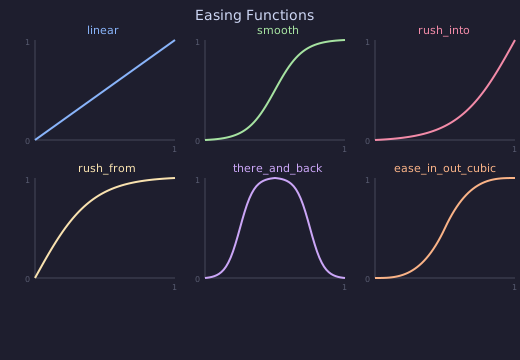
Basic
- linear(t)
Constant speed. No acceleration.
- smooth(t, inflection=10.0)
Sigmoid-based smooth curve. Default for most animations.
- rush_into(t, inflection=10.0)
Fast start, gradual stop.
- rush_from(t, inflection=10.0)
Gradual start, fast end.
- there_and_back(t, inflection=10.0)
Go out and come back. Used for effects like
indicateandflash.
- there_and_back_with_pause(t, pause_ratio=1.0 / 3)
Out, pause, then back.
- wiggle(t, wiggles=2)
Oscillating ease-out.
- lingering(t)
Slow start, fast end.
- exponential_decay(t, half_life=0.1)
Exponential decay.
Sine
- ease_in_sine(t)
- ease_out_sine(t)
- ease_in_out_sine(t)
Power (quad, cubic, quart, quint)
- ease_in_quad(t)
- ease_out_quad(t)
- ease_in_out_quad(t)
- ease_in_cubic(t)
- ease_out_cubic(t)
- ease_in_out_cubic(t)
- ease_in_quart(t)
- ease_out_quart(t)
- ease_in_out_quart(t)
- ease_in_quint(t)
- ease_out_quint(t)
- ease_in_out_quint(t)
Exponential
- ease_in_expo(t)
- ease_out_expo(t)
- ease_in_out_expo(t)
Circular
- ease_in_circ(t)
- ease_out_circ(t)
- ease_in_out_circ(t)
Back (overshoot)
- ease_in_back(t)
- ease_out_back(t)
- ease_in_out_back(t)
Elastic (oscillation)
- ease_in_elastic(t)
- ease_out_elastic(t)
- ease_in_out_elastic(t)
Bounce
- ease_in_bounce(t)
- ease_out_bounce(t)
- ease_in_out_bounce(t)
Combinators
- not_quite_there(func=smooth, proportion=0.7)
Scale an easing’s output to a proportion of the full range.
- squish_rate_func(func, a=0.4, b=0.6)
Compress an easing into the interval
[a, b]within [0, 1].